


How to View Your Email History in the KnownHost Client Portal
Last Updated: April 8, 2026
The KnownHost Client Portal keeps a log of all system emails sent to your account; including invoices, payment confirmations, service notifications, and welcome emails. This guide walks you through how to find and review that history.
What You’ll Need
- Your KnownHost account login credentials
- Access to my.knownhost.com
Steps to Access Your Email History
1. Log in to the KnownHost Client Portal
Navigate to my.knownhost.com and sign in with your registered email address and password.
2. Open Email History
Once logged in, click the user/profile icon located in the top-right corner of the page, then select Email History.
This section displays a log of all emails that the system has sent to your account.
3. Browse Your Emails
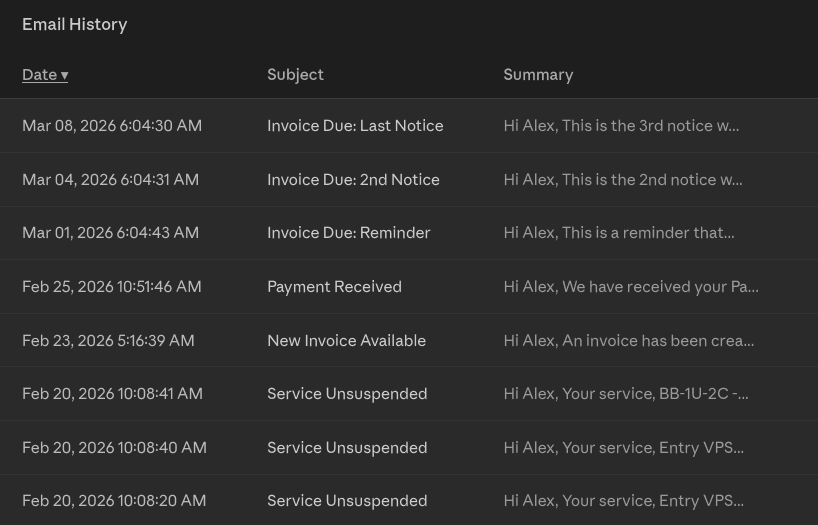
You will see a list of emails in reverse chronological order (newest first). Each entry typically shows:
- The date and time the email was sent
- The subject of the email
- Options to view the full email content (usually via a Text or HTML tab within the entry)
Click on any entry to expand and read the full contents of that email.
Tips
- Missing an email in your inbox? Check your Email History first! It will confirm whether the system sent it, and you can view the full contents directly from the portal.
- Invoice and payment emails are among the most commonly accessed entries in this log.
- Email history is tied to your account, so contact emails sent to sub-contacts may not appear here. If you manage contacts on your account, each contact’s email activity may be separate.
- Certain emails such as VPS/dedicated server creations or other emails that contain passwords may not appear or have the sensitive information redacted. Contact support if you need to retrieve this information
Need Further Assistance?
If you have trouble locating a specific email or have questions about your account notifications, our Billing team is available seven days a week from 7AM–7PM CST. You can reach them by opening a support ticket directly from the Client Portal under the Helpdesk section.